



Skip to content
View in the app

A better way to browse. Learn more.

iniBuilds Forum

A full-screen app on your home screen with push notifications, badges and more.

To install this app on iOS and iPadOS
  1. Tap the Share icon in Safari
  2. Scroll the menu and tap Add to Home Screen.
  3. Tap Add in the top-right corner.
To install this app on Android
  1. Tap the 3-dot menu (⋮) in the top-right corner of the browser.
  2. Tap Add to Home screen or Install app.
  3. Confirm by tapping Install.

Thomas Shepard

Member
  • Joined

  • Last visited

Everything posted by Thomas Shepard

  1. I actually only use SayIntentions and haven't ever used Hoppie. Never was a problem before the update.
  2. The photo doesn't show it well but ever since the update when I go to D-ATIS to make a request the "Send Request" buttons and "Update All" buttons are unavailable. The "Auto Update" buttons are available and work for the two default airports that come from the flight plan that is imported. If you change the airport they won't work again though.
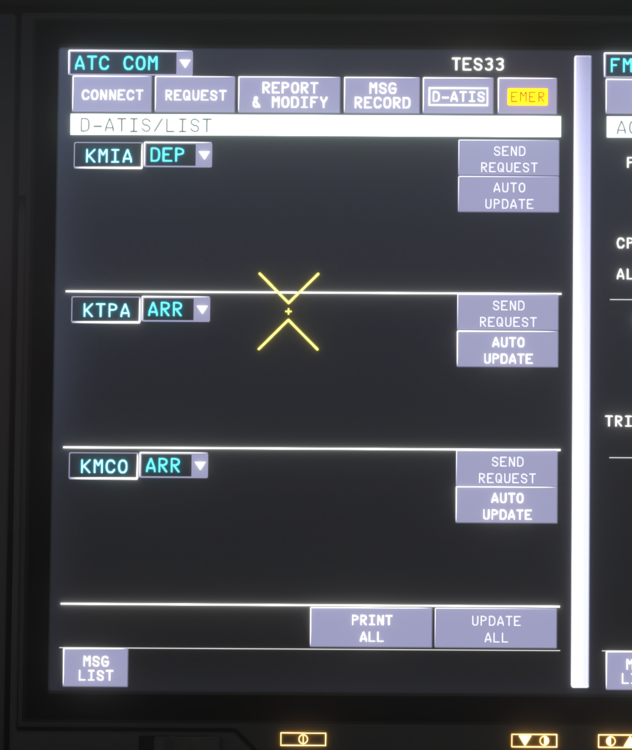
  3. I also have this issue. When d-atis requests are sent they purportedly come back but while the new message notifications come up they are completely blank.

Account

Navigation

Configure browser push notifications

Chrome (Android)
  1. Tap the lock icon next to the address bar.
  2. Tap Permissions → Notifications.
  3. Adjust your preference.
Chrome (Desktop)
  1. Click the padlock icon in the address bar.
  2. Select Site settings.
  3. Find Notifications and adjust your preference.