





refats
Member
-
Joined
-
Last visited
-
deleted WASM Folder, problem still persists. cant use my Navigraph Account with the A350. WHAT DO I DO?
-
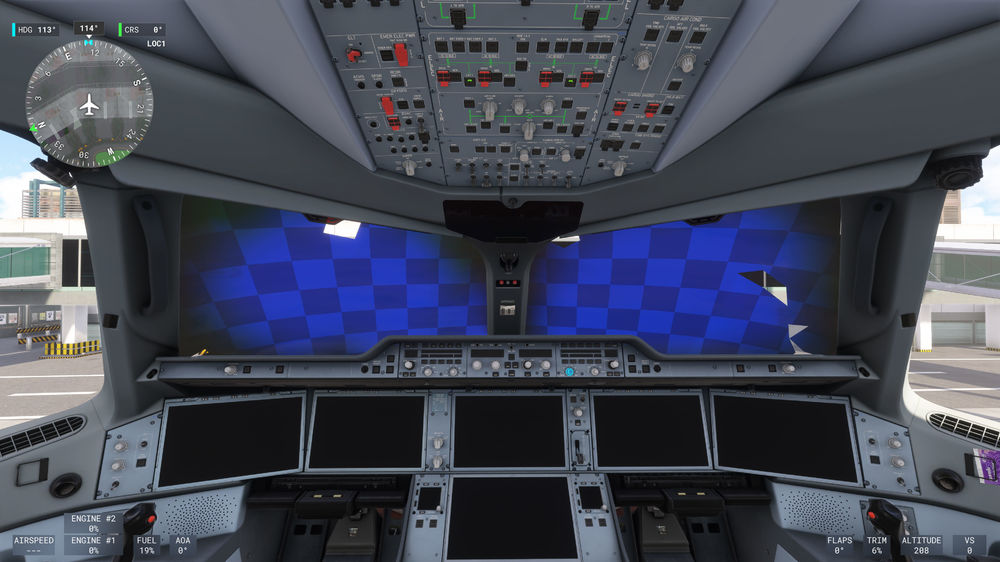
resolution to solve this was finding and deleting an old LowRes Texture mod i somehow still had in my community folder. thx for the "support" here in this forum, next time i ask directly on reddit, they are way more helpful over there.
-
deinstalled it, installed it again, still the same. What is the problem here? i need a solution!
Kopie.thumb.jpg.d1330f4a711ce02c7c33c51f13af846c.jpg)
-
refats changed their profile photo
-
Since the last update i have this texture error on the windshield with every livery, obviously can't fly like this. Edit: forgot the Sim: Msfs2024

Kopie.jpg.1531619d570b8f5262b2cce5bde5da99.jpg)
