



Skip to content
View in the app

A better way to browse. Learn more.

iniBuilds Forum

A full-screen app on your home screen with push notifications, badges and more.

To install this app on iOS and iPadOS
  1. Tap the Share icon in Safari
  2. Scroll the menu and tap Add to Home Screen.
  3. Tap Add in the top-right corner.
To install this app on Android
  1. Tap the 3-dot menu (⋮) in the top-right corner of the browser.
  2. Tap Add to Home screen or Install app.
  3. Confirm by tapping Install.

Vincent Catteau

Member
  • Joined

  • Last visited

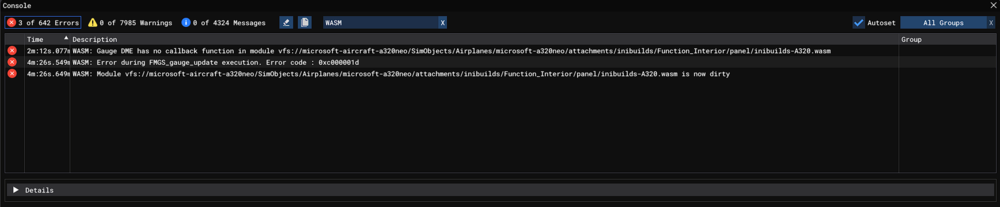
  1. Hello, I experienced a WASM crash when I selected ILS Y for LFRS in the MCDU. It's the case at least for a320neo and a321LR. To reproduce : Load at gate in LFMN (didn't try other airports) Power on aircraft (Battery, GPU) Go to MCDU INIT page Type LFMN/LFRS Go to F-PLN page Select LFRS Click on ARRIVAL Choose any ILS Systems freeze Information Aircraft: A320neo (v2) & A321LR (at least) Simulator: FS24 Navdata Method: MSFS Navdata OFP: See above Specs: Ryzen 9600X, RX 7800XT, 32GB RAM Autosave: I don't have any autosave file WASM: Error during FMGS_gauge_update execution. Error code : 0xc000001d
Account

Navigation

Configure browser push notifications

Chrome (Android)
  1. Tap the lock icon next to the address bar.
  2. Tap Permissions → Notifications.
  3. Adjust your preference.
Chrome (Desktop)
  1. Click the padlock icon in the address bar.
  2. Select Site settings.
  3. Find Notifications and adjust your preference.