




slipperfruit
Member
-
Joined
-
Last visited
-
I had the same problem (at least I think) that shows no error except for VDGS. Lovely plane and I can't wait for iniBuilds to fix the sim/WASM connection!
-
@iniBuilds Team
-
Yesterday I tried doing a flight from OTHH to KLAX in the A35K. I turned in the electrical power of my plane. I then opened GSX. It said "simbrief OK" but then only loaded one passenger. I restarted couatl to quit GSX because it didnt seem to work. In the OIS I hit LOAD FUEL and set it to instand and the fuel loaded correctly. When I hit LOAD ZFW i could tell the airplane moved slightly but the OIS perf page when I automatically got the weights AND in the fmc when I automatically set them were like around 150 tons, I forget exaxt number, but it was equal to the zero fuel weight, meaning the ZFW didnt load correctly. I also made sure all my units were in kilograms or tons.
-
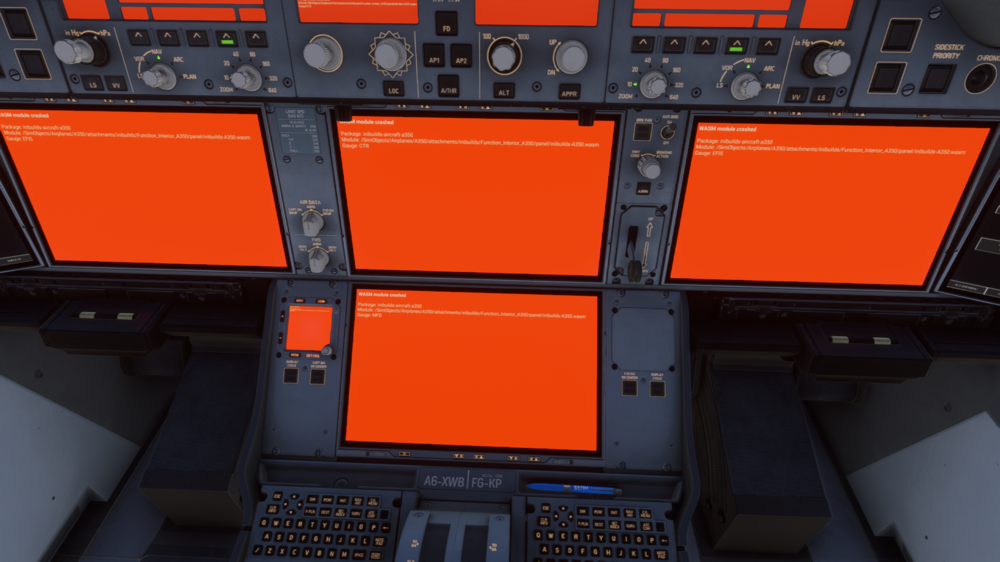
1.1.7 MSFS 2024 SU4 Navigraph RX 7800 XT, I5-13600KF, 32GB RAM WASM: ERR_FATAL_FILE_ERROR (-239 / ffffff11) WASM: Error -239 / ffffff11 [fsdt-msfs-bridge.wasm] fsdt-msfs-bridge: Simconnect Dispatch proc set. [noolaero-vdgs-lsgg.wasm] Sim | EXCEPTION 25: The AI operation requested cannot be completed [noolaero-vdgs-ksea.wasm] Sim | EXCEPTION 25: The AI operation requested cannot be completed [noolaero-vdgs-lszh.wasm] Sim | EXCEPTION 25: The AI operation requested cannot be completed [noolaero-vdgs-ksfo.wasm] [noolaero-vdgs-ksfo] EXCEPTION 25: The AI operation requested cannot be completed [noolaero-vdgs-bikf.wasm] [noolaero-vdgs-bikf] EXCEPTION 25: The AI operation requested cannot be completed [AirshowAssistant.wasm] AIRSHOW ASSISTANT: variable set success [inibuilds-A350.wasm] Error: Unable to open directory [inibuilds-A350.wasm] \work\autosaves\ [inibuilds-A350.wasm] WASM: Error during MFD_gauge_update execution. Error code : 0xc0000005 WASM: Module vfs://inibuilds-aircraft-a350/SimObjects/Airplanes/A350/attachments/inibuilds/Function_Interior_A350/panel/inibuilds-A350.wasm is now dirty It happened when I was loading the departure in the FMC. OMAAKORD_PDF_1764146865.pdf
-
Anyone know?
-
Hello everyone, Since the launch of the iniBuilds A350 for MSFS2024, I have only had 1 or 2 successful flights, after 10+ failed flights. I bought it on iniManager and have it updated. I have tried flying with A359, A35K, and the ULR but they all WASM crash, sometime when I am sleeping. I am talking about 14 hour long hauls. I have tried flying right after restarting PC and after having it running for several hours. Basically what happens when I am sleeping (it also happened once while I was there) is the systems and screens freeze up and the plane just starts going in WIDE circles and slowly descending. My drivers are updated. I have a i5-13600KF, RX 7800 XT, and 32 GB RAM. I run the A350 on 4K with no cabin. MSFS graphics are on medium preset except for high clouds and ultra texture resolution. I have no WASM crashes with the PMDG 777 or the iniBuilds A340 on long hauls. I am on the latest stable MSFS version (not the beta) from the Microsoft Store.
