



Skip to content
View in the app

A better way to browse. Learn more.

iniBuilds Forum

A full-screen app on your home screen with push notifications, badges and more.

To install this app on iOS and iPadOS
  1. Tap the Share icon in Safari
  2. Scroll the menu and tap Add to Home Screen.
  3. Tap Add in the top-right corner.
To install this app on Android
  1. Tap the 3-dot menu (⋮) in the top-right corner of the browser.
  2. Tap Add to Home screen or Install app.
  3. Confirm by tapping Install.

Andreas Guther

Member
  • Joined

  • Last visited

Everything posted by Andreas Guther

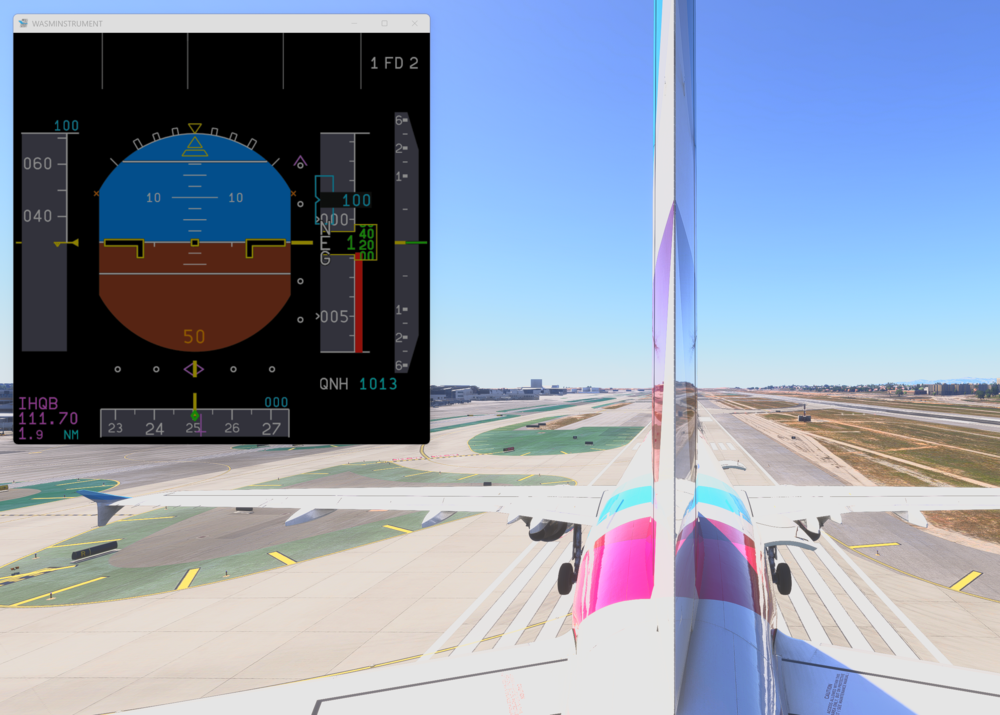
  1. The ILS glideslopes are not correctly aligned. Target is to cross the runway threshold at 50 ft RA, as visible in the screenshot the actual glideslope is much higher. I checked all ILS approaches in eastern direction, and they are all wrong. Therefore, the others should be checked as well. IMHO, the correctness of such things is much more important than eye candy inside the airport...
  2. Same here, the plane is completely unusable but it's even worse for me. Starting on the runway and its already frozen right away.

Account

Navigation

Configure browser push notifications

Chrome (Android)
  1. Tap the lock icon next to the address bar.
  2. Tap Permissions → Notifications.
  3. Adjust your preference.
Chrome (Desktop)
  1. Click the padlock icon in the address bar.
  2. Select Site settings.
  3. Find Notifications and adjust your preference.