





boozysheep
Member
-
Joined
-
Last visited
Everything posted by boozysheep
-
So I was trying to let my throttle “choose” where the detents were, you need to choose where you want them not the other way around. So just go into the efb set you idle at the bottom and your toga at the top and then choose where you think the flex and clb defends make the most sense. Then it will stretch them out. I hope that makes sense. It just another way to think about it I guess.
-
Disregard I have figured it out, I am dumb. Thanks
-
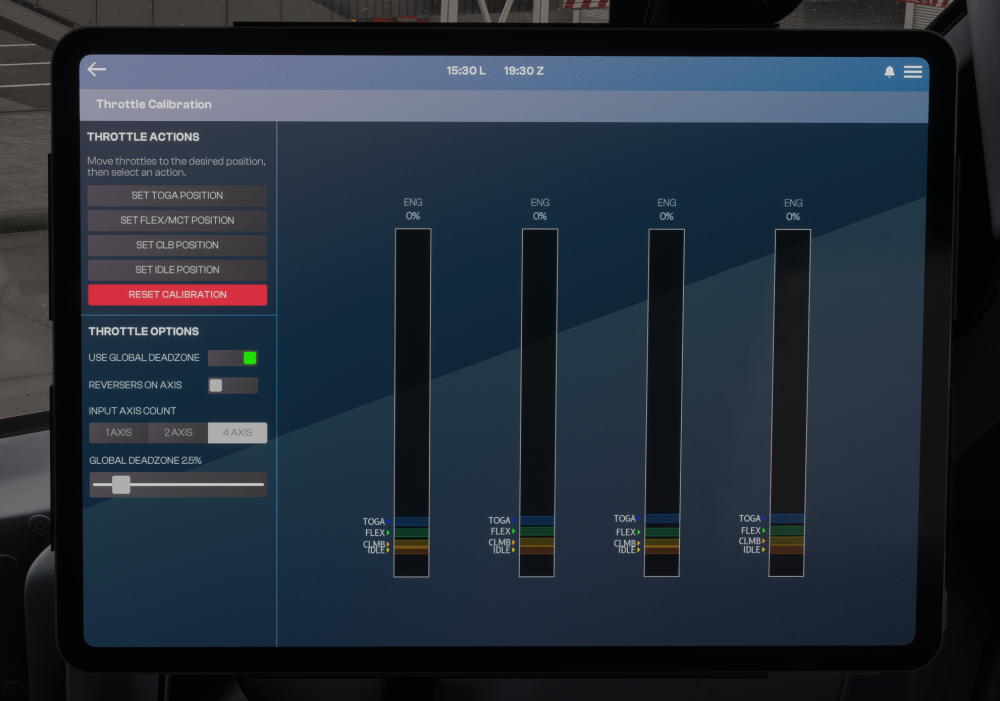
I have literally tried everything under the sun from A-Z to stop all those gates from piling up on the bottom of the gauge and they just won’t spread out. New profiles, uninstall, cleared WASM, follow every procedure, usb calibration, etc, etc , etc. The plane just piles all the gates at the bottom of the range and I have no idea why.
-
any word about this, I tried the a350 today and it works perfect if that helps at all lol
-
Thank you so much, other than this small issue I am loving the plane. Great job by yall!
-
see how it piles them all up at the bottom of the gauge
-
sorry had to work for a few days but yes its set to AXIS and not 1-100%. I could send a video perhaps if it helps.
-
I am also having issues its like the "throw" of the axis is super short and no adjustment of the sensitivities will fix it, as in I barely move the axis and it goes through the entire gambit from CLB to TOGA all in like a 1/2 an inch


