



Skip to content
View in the app

A better way to browse. Learn more.

iniBuilds Forum

A full-screen app on your home screen with push notifications, badges and more.

To install this app on iOS and iPadOS
  1. Tap the Share icon in Safari
  2. Scroll the menu and tap Add to Home Screen.
  3. Tap Add in the top-right corner.
To install this app on Android
  1. Tap the 3-dot menu (⋮) in the top-right corner of the browser.
  2. Tap Add to Home screen or Install app.
  3. Confirm by tapping Install.

jrookareenz

Member
  • Joined

  • Last visited

  1. i did what you said, cleared the sceneryindex, uninstalled the default omdb, and reinstalled the scenery but they’re still pink
  2. jrookareenz changed their profile photo
  3. well i just now found out i could turn off static aircraft, but i still need help about the trees and optimisation
  4. i just installed the addon and the trees arent loaded, which is annoying to look at also is there anyway to remove static aircrafts, and is there any way to optimise the addon because its very laggy
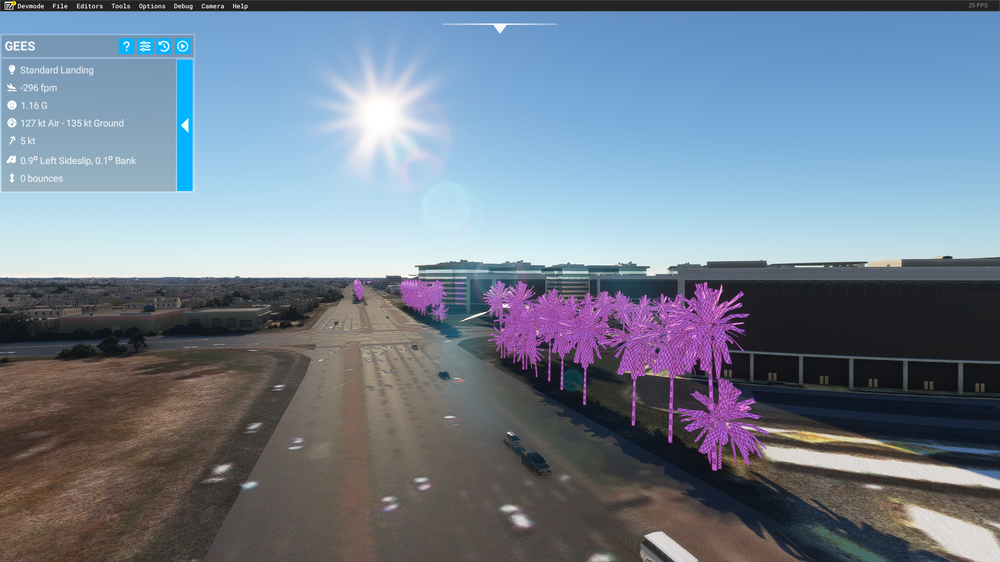
  5. nevermind, i cleared the sceneryindexes, the scenerycache, and the content.xml and it works now
  6. i installed the airport via the inimanager, but despite that the scenery just wouldnt load, i uninstalled the msfs scenery for stansted i think, and i tried using msfslayoutgenerator but to no avail and now im just lost

Account

Navigation

Configure browser push notifications

Chrome (Android)
  1. Tap the lock icon next to the address bar.
  2. Tap Permissions → Notifications.
  3. Adjust your preference.
Chrome (Desktop)
  1. Click the padlock icon in the address bar.
  2. Select Site settings.
  3. Find Notifications and adjust your preference.