Daniel10042000
Member
-
Joined
-
Last visited
-
What I noticed in the A300 is that between the 40 and 30 callout there is always a big "pause" independent of the rate of descent. Even without flaring at all, the time between the 40 and 30 callout is a lot longer than between the other callouts. As you are working on an update, maybe you can put this on the list as well and investigate it.
-
Hi there, is it planned to add some new A340 functions to the lovely A300? What would bring this plane to the next level: Proper support for Sim Rate, including: - finally fix the problem that fuel flow is not adapted to the sim rate - sim rate setting in EFB - more stable at 4x sim rate (currently the A300 does not hold the CRZ ALT very stable and constantly fluctuates +/- 200ft up and down) - option for "Pause at TOD" Would appreciate a feedback from your side if it is realistic to get an update for this soon? Given that the A300 was used for longer flights these features would make life a lot easier 🙂
-
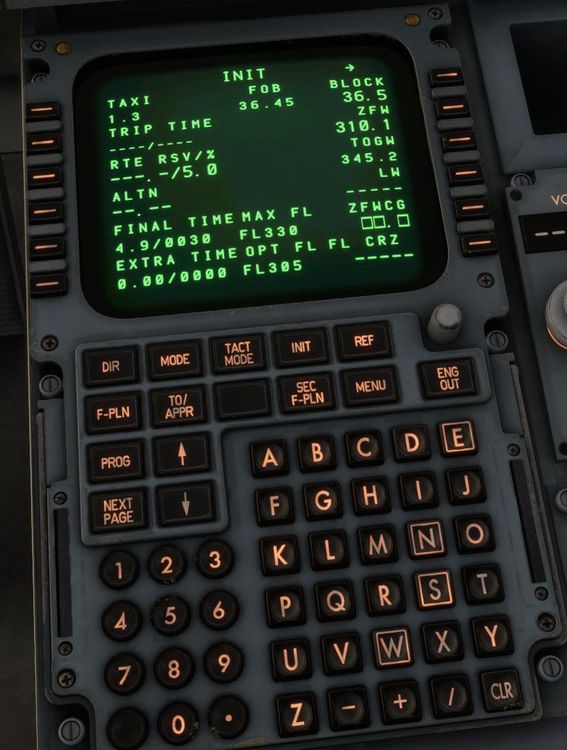
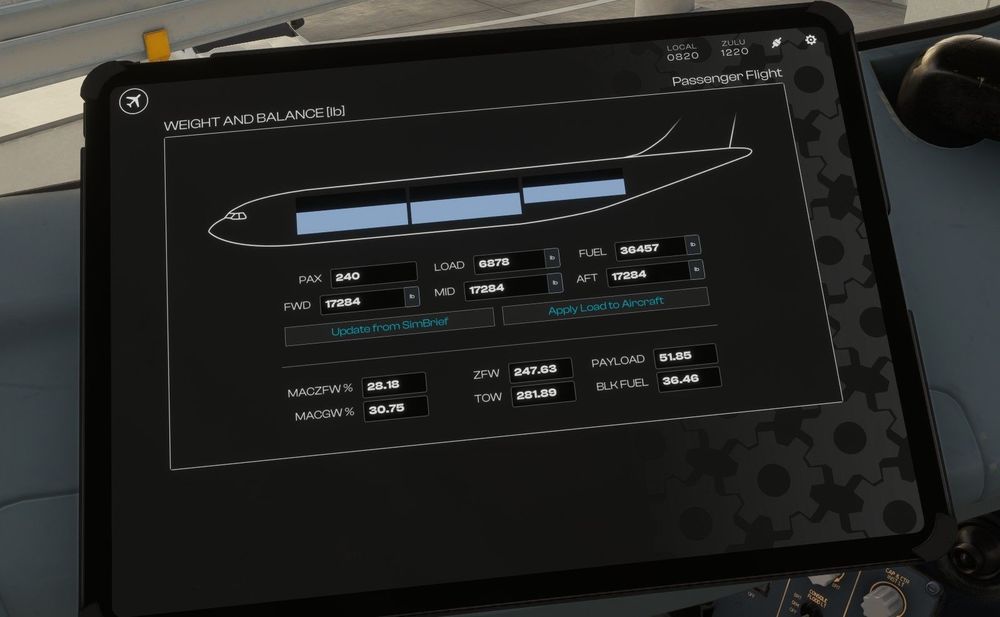
I noticed a weird bug with the W&B calculations. What I did: - Simbrief import of weights into the EFB and applied load >> EFB shows correct weights - When I click the LSK next to ZFW in the MCDU to import the ZFW it shows the wrong weight What is interesting is that it only happens having selected the imperial system (lbs). Using the metric system (kgs) everything works absolutely fine. Tested with PAX Version GE