




Lewis Hughes
Member
-
Joined
-
Last visited
Everything posted by Lewis Hughes
-
Hi, when the A350 dropped on Xbox for the 2024 version we were promised a release on the 2020 version of the game for Xbox, is this still happening, if so how much longer do we have to wait!!?
-
Thank you this will come in handy loads
-
I don’t know how to help but I found when I put a sid in the heading went to manage mode but I have to be careful because if it goes back to selected after this then I can’t get it back I don’t have a problem with the autopilot not following the flight plan so I don’t know how to help sorry
-
73861663424__AE93BF19-9205-4EB1-AB70-8019B8D2624A.MOV I can’t get it to work
-
Thanks I’ll sort that out I don’t think I had my button mapped to the right thing
-
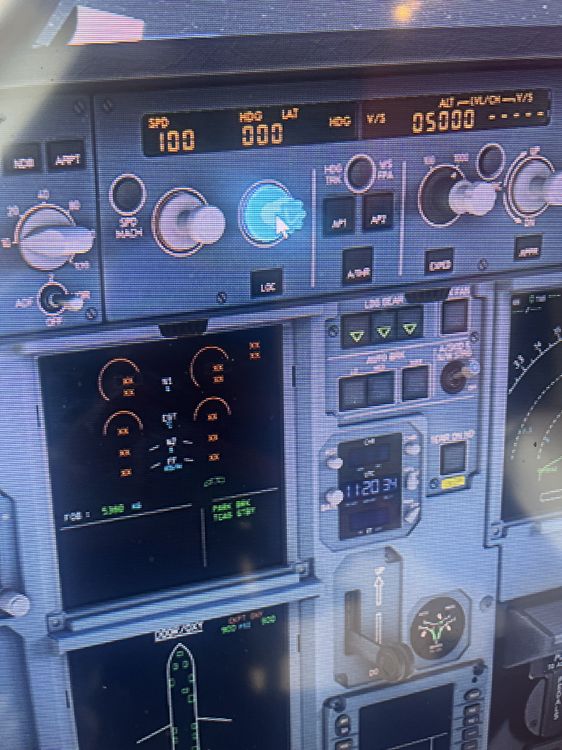
I can’t get the heading selector out of this mode
-
The heading selector in the autopilot doesn’t seem to work. When you put it in heading manual mode I can’t seem to press it back in so it goes back to manage. This means after I’m done following vectors I can’t put the heading mode back to follow the flight plan. This effectively ruins the flight as the plane can’t follow the flight plan anymore. In my latest flight when I spawned in the heading mode was in manual. When I couldn’t get it into manage mode before takeoff I couldn’t and when I took off the plane wouldn’t follow the flight plan as it was In the wrong mode so I stopped my flight. i hope this is something that can be fixed in Xbox as that’s what I fly on
-
I have the same issue! When I change the heading select into manual mode I can’t change it back to manage. I’ve had to restart flights because of this issue
-
When landing I’m consistently having the issue of when I take the autopilot off the autopilot disconnect would constantly plays out after I acknowledge the caution light. I also get a warning on my ECAM saying that autopilot has disconnected does anyone know what I can do to stop the constant disconnect noise after I take the autopilot off
-
When landing I’m consistently having the issue of when I take the autopilot off the autopilot disconnect would constantly plays out after I acknowledge the caution light. I also get a warning on my ECAM saying that autopilot has disconnected does anyone know what I can do to stop the constant disconnect noise after I take the autopilot off
-
I had this isssue when flying the Faro approach last night on runway 28 the old didn’t show up

