Skip to content
View in the app

A better way to browse. Learn more.

iniBuilds Forum

A full-screen app on your home screen with push notifications, badges and more.

To install this app on iOS and iPadOS
  1. Tap the Share icon in Safari
  2. Scroll the menu and tap Add to Home Screen.
  3. Tap Add in the top-right corner.
To install this app on Android
  1. Tap the 3-dot menu (⋮) in the top-right corner of the browser.
  2. Tap Add to Home screen or Install app.
  3. Confirm by tapping Install.

jayyk47

Member
  • Joined

  • Last visited

  1. Good to know i'm not the only one experiencing this. Now i'm positive it's a bug on Inibuilds behalf hopefully they look into this and get it fixed.
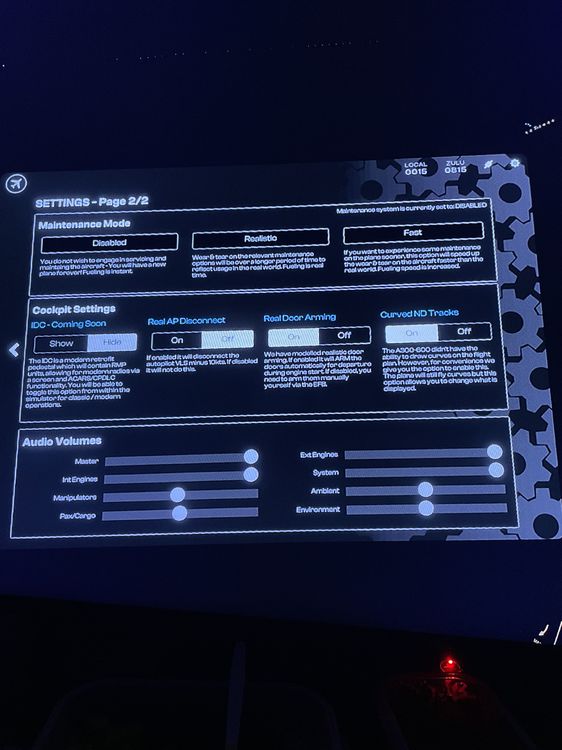
  2. Im on Xbox and i'm on version 1.09 here is a picture

  3. i don't have that option in my EFB settings these are the only one's i can select
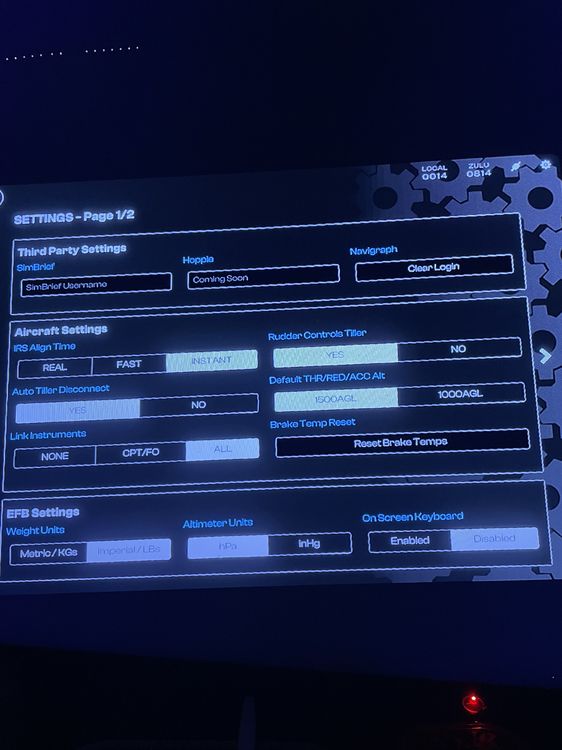
  4. So i seen in update V1.08 the ability to refuel while the engines are running was added as an option in the EFB settings but i've looked everywhere in the EFB settings and i cant find this option anywhere is this a bug or was it removed ? also Im on XBOX flying V1.09 of the plane

Account

Navigation

Configure browser push notifications

Chrome (Android)
  1. Tap the lock icon next to the address bar.
  2. Tap Permissions → Notifications.
  3. Adjust your preference.
Chrome (Desktop)
  1. Click the padlock icon in the address bar.
  2. Select Site settings.
  3. Find Notifications and adjust your preference.