



Skip to content
View in the app

A better way to browse. Learn more.

iniBuilds Forum

A full-screen app on your home screen with push notifications, badges and more.

To install this app on iOS and iPadOS
  1. Tap the Share icon in Safari
  2. Scroll the menu and tap Add to Home Screen.
  3. Tap Add in the top-right corner.
To install this app on Android
  1. Tap the 3-dot menu (⋮) in the top-right corner of the browser.
  2. Tap Add to Home screen or Install app.
  3. Confirm by tapping Install.

Scotty

Member
  • Joined

  • Last visited

Everything posted by Scotty

  1. Found the solution - remove the cut option Scott
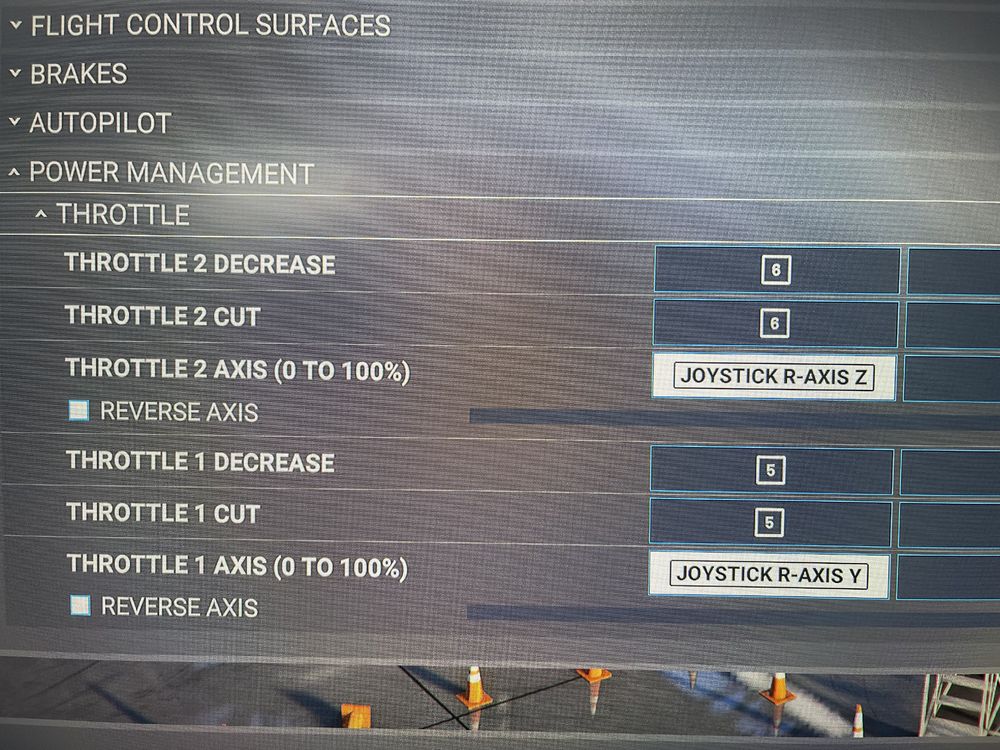
  2. Hi, Attached are my throttle config settings. Trying to use the reverser handles on the thrustmaster TCA throttle. The Eng 2 reverser works but Eng 1 does not. if I use toggle reverse it reverses both engines (but you can only bind it to one lever ) any ideas thanks Scott
  3. Hi, I was trying to find the GSX profile file in the scenery folder but couldn't find the scenery folder itself. I looked in C:\Users\\AppData\Local\Packages\Microsoft.FlightSimulator_8wekyb3d8bbwe\LocalCache\Packages\Official\OneStore but it is empty EGSS is installed and working. I downloaded the GSX profile from the other threD. Where has MS hidden it? Scott

Account

Navigation

Configure browser push notifications

Chrome (Android)
  1. Tap the lock icon next to the address bar.
  2. Tap Permissions → Notifications.
  3. Adjust your preference.
Chrome (Desktop)
  1. Click the padlock icon in the address bar.
  2. Select Site settings.
  3. Find Notifications and adjust your preference.