




WoodBein
Member
-
Joined
-
Last visited
-
Video of the loss of all primary Flight displays and how the arrival page was set up.
-
Hey I selected the DAMEN5 [KSDF] STAR with DAAVE transition, no runway selected not executed. Then I wanted to look for another arrivals, so I deleted the transition, tried to go back in the STAR menu and this causes my cockpit to freeze. All screens are frozen, AP switches dont working, profile etc doesnt react on inputs. Otherwise the gear leaver and the overhead panel and also the weather radar section still working. Maybe you can reproduce this bug.
-
selected ILS01 via KERRY transition as written above.
-
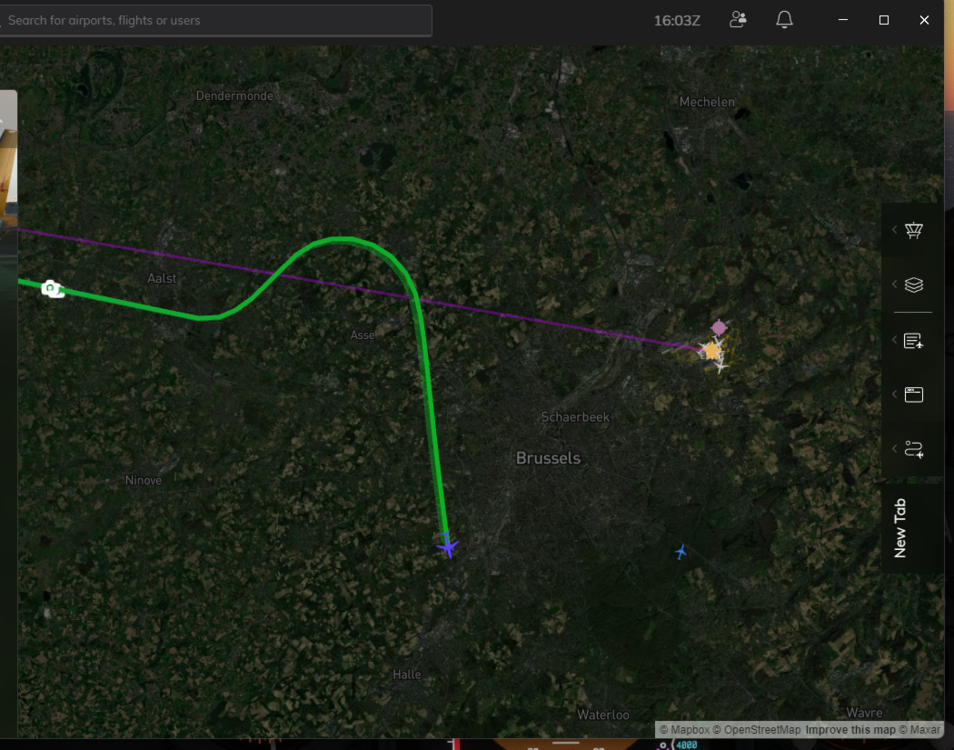
Into Brussels via KOK8A STAR and KERRY Trans. ILS 01 AP chosses not to fly into NIVOR instead a rightern turn it chosses a leftern turn.
-
On my flight from Brussels (SOPOK3T), NAV mode flew a weird route after BULUX, the AP started a left turn instead of a right turn to SOPOK.


