




dman777
Member
-
Joined
-
Last visited
-
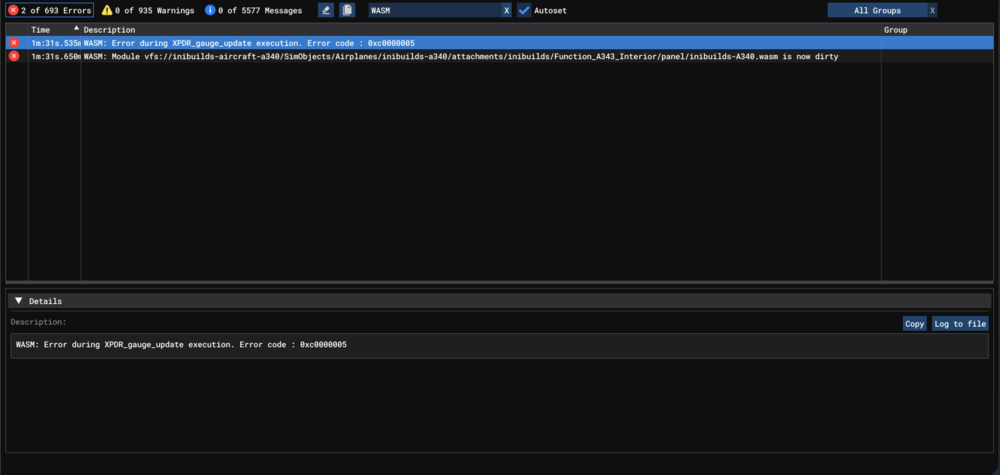
Same thing for, since SU4 I cannot spawn the A340 on the runway - it floats with landing gear retracted and orange screens with WASM crash in the cockpit. Starting cold and dark at gate is fine. Console errors (there are no details for either error):
-
I had this happen yesterday in the A320 V2, flying the following route: CYUL/24L N0434F360 DCT BOBKI DCT MELTI DCT TORNI RAGID5 CYYZ/15L It was on approach, I chose a transition in the FMS per ATC instruction, tried DIR to a specific waypoint and the FMS became unresponsive.
-
It would be nice if we got a bit more info about why the A310 just stopped working for everyone out of the blue, when the fix is being submitted to MS, and when MS might actually roll it out. For all we know it could be weeks, but the devs are just locking the threads about it so obviously questions like this are not welcome.
-
@Haseen did you ever figure this out? I have the same problem, sim rate increase / decrease just doesn't work in the A310, using R and ctrl -/+ or custom hotas bindings. They work in every other plane, just not the A310.
-
Hmm ok, it definitely does not for me. Also tried mapping sim rate increase / decrease to hotas buttons, and nothing, no impact at all in the A310. Jumped into a different plane (787), time acceleration works. Any way to try and debug it?
-
Using the default key bindings of 'r' followed by ctrl + / ctrl - doesn't seem to work for time acceleration in the A310. Is it supposed to?

