



Skip to content
View in the app

A better way to browse. Learn more.

iniBuilds Forum

A full-screen app on your home screen with push notifications, badges and more.

To install this app on iOS and iPadOS
  1. Tap the Share icon in Safari
  2. Scroll the menu and tap Add to Home Screen.
  3. Tap Add in the top-right corner.
To install this app on Android
  1. Tap the 3-dot menu (⋮) in the top-right corner of the browser.
  2. Tap Add to Home screen or Install app.
  3. Confirm by tapping Install.

Chairman941

Member
  • Joined

  • Last visited

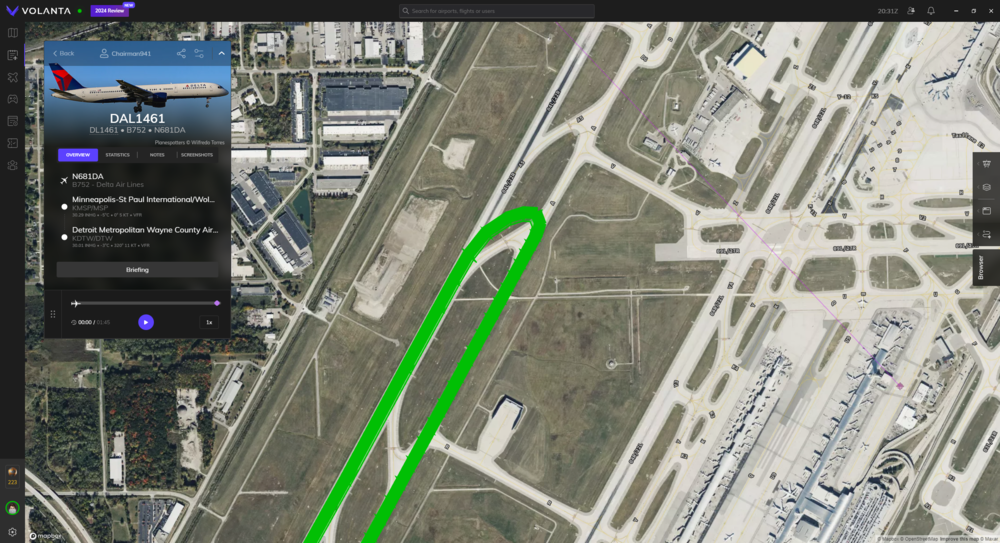
  1. I was on a flight into KDTW, and I had to exit at A4 on RWY 04L. I watched my Navigraph charts and noticed my plane was not on the taxiway but a little north of it. I assumed it was the chart's fault, but then I looked at Volanta too and confirmed--with satellite imagery--that exit A4 in the iniBuilds scenery is way off of where it should be. Will iniBuilds please take a look at this and fix it? I've attached a screenshot of my Volanta to prove that it's way off.
Account

Navigation

Configure browser push notifications

Chrome (Android)
  1. Tap the lock icon next to the address bar.
  2. Tap Permissions → Notifications.
  3. Adjust your preference.
Chrome (Desktop)
  1. Click the padlock icon in the address bar.
  2. Select Site settings.
  3. Find Notifications and adjust your preference.