



Skip to content
View in the app

A better way to browse. Learn more.

iniBuilds Forum

A full-screen app on your home screen with push notifications, badges and more.

To install this app on iOS and iPadOS
  1. Tap the Share icon in Safari
  2. Scroll the menu and tap Add to Home Screen.
  3. Tap Add in the top-right corner.
To install this app on Android
  1. Tap the 3-dot menu (⋮) in the top-right corner of the browser.
  2. Tap Add to Home screen or Install app.
  3. Confirm by tapping Install.

kerbo

Member
  • Joined

  • Last visited

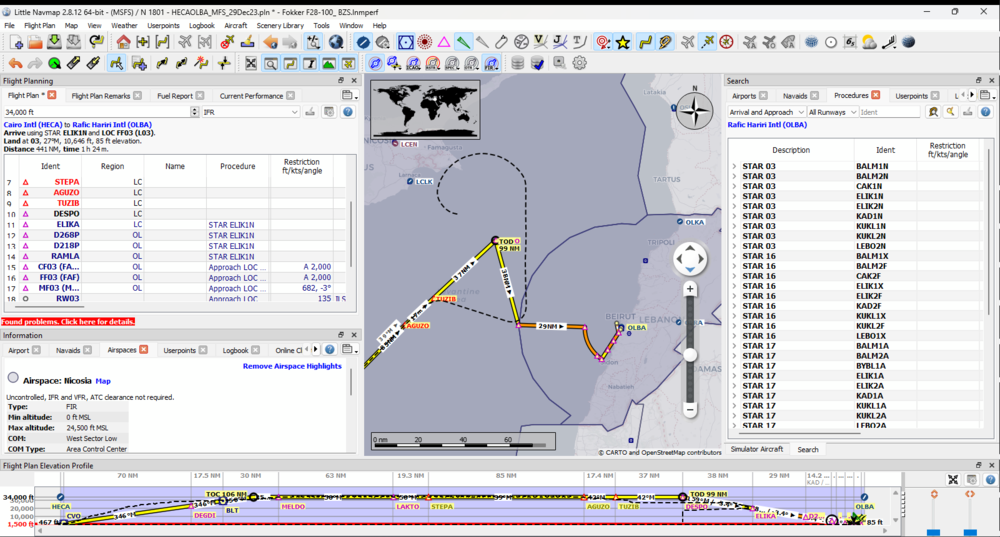
  1. Same issue but with STAR ELIK1N at OLBA, as it gets to an INTCP wpt it banks to the left and goes in a straight line, you can see when I tried to DIRECT again to the INTCP point as it turned and went back around, but then continued turning, at this point I terminated the flight
  2. may you also add some sort of indication of current sim rate. On the EFB or something.

Account

Navigation

Configure browser push notifications

Chrome (Android)
  1. Tap the lock icon next to the address bar.
  2. Tap Permissions → Notifications.
  3. Adjust your preference.
Chrome (Desktop)
  1. Click the padlock icon in the address bar.
  2. Select Site settings.
  3. Find Notifications and adjust your preference.