



Skip to content
View in the app

A better way to browse. Learn more.

iniBuilds Forum

A full-screen app on your home screen with push notifications, badges and more.

To install this app on iOS and iPadOS
  1. Tap the Share icon in Safari
  2. Scroll the menu and tap Add to Home Screen.
  3. Tap Add in the top-right corner.
To install this app on Android
  1. Tap the 3-dot menu (⋮) in the top-right corner of the browser.
  2. Tap Add to Home screen or Install app.
  3. Confirm by tapping Install.

OY-RUT

Member
  • Joined

  • Last visited

Everything posted by OY-RUT

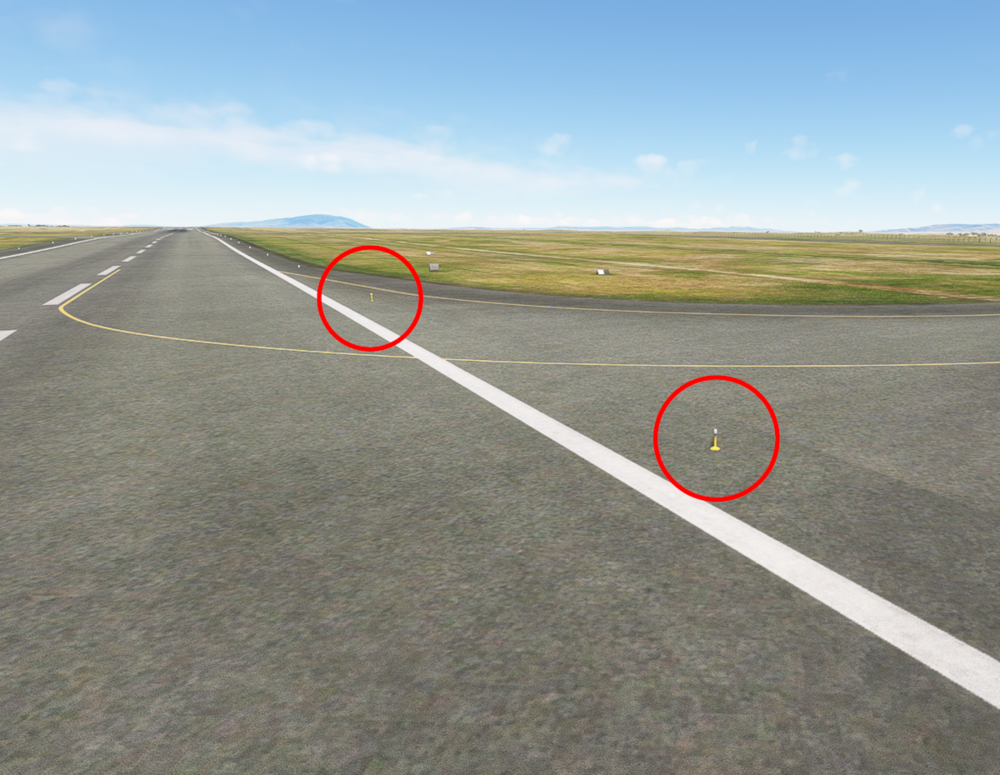
  1. Thanks for this very nice Nairobi airport! Unfortunately there are many Runway edge lights standing directly on taxiways. They should be inserted in the tarmac as we dont want to taxi over it. 😉 Hope this can be fixed?
  2. I sent you a PM as I don't want to publish official documents here 😬
  3. According to the Aeronautical Charts, NFFN has no Center Line Lights on Runways and Taxiways, but the Inibuilds version has. Maybe this can be fixed? 🙂

Account

Navigation

Configure browser push notifications

Chrome (Android)
  1. Tap the lock icon next to the address bar.
  2. Tap Permissions → Notifications.
  3. Adjust your preference.
Chrome (Desktop)
  1. Click the padlock icon in the address bar.
  2. Select Site settings.
  3. Find Notifications and adjust your preference.