



Skip to content
View in the app

A better way to browse. Learn more.

iniBuilds Forum

A full-screen app on your home screen with push notifications, badges and more.

To install this app on iOS and iPadOS
  1. Tap the Share icon in Safari
  2. Scroll the menu and tap Add to Home Screen.
  3. Tap Add in the top-right corner.
To install this app on Android
  1. Tap the 3-dot menu (⋮) in the top-right corner of the browser.
  2. Tap Add to Home screen or Install app.
  3. Confirm by tapping Install.

Guffnuts

Member
  • Joined

  • Last visited

Everything posted by Guffnuts

  1. Glad it's not just me. Title edited. After the 11 hour flight, descent phase and approach went without issue.
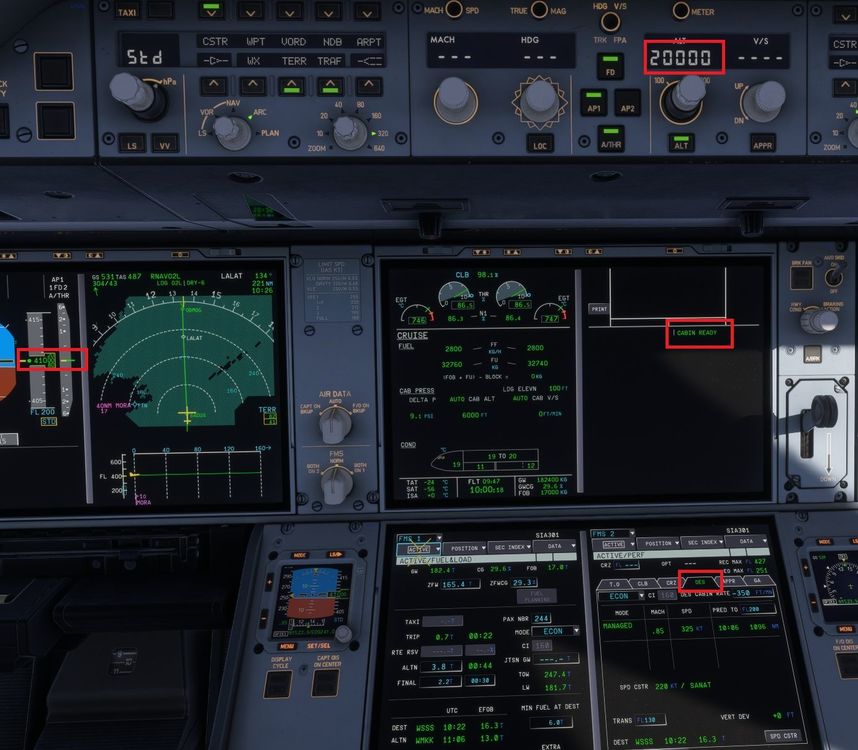
  2. Currently 10 hours in to EGLL-WSSS and have noticed a couple of things since the latest update. Upon departure, the PERF page would instantly switch to DES phase with no way of forcing the FL to reinstate the CLB phase. I was not able to fly the managed ascent of the SID. Once cleared for cruise altitude, the CLB phase would initiate after selecting 20000 or above. Whilst in CRZ, selecting an altitude below 20000 would initiate the DES page, without actually selecting to descend. Secondly, "Cabin ready" appears permanently. No way of clearing. As said, minor issues and not something i've encountered in previous versions.
Account

Navigation

Configure browser push notifications

Chrome (Android)
  1. Tap the lock icon next to the address bar.
  2. Tap Permissions → Notifications.
  3. Adjust your preference.
Chrome (Desktop)
  1. Click the padlock icon in the address bar.
  2. Select Site settings.
  3. Find Notifications and adjust your preference.