




Hnanse_Rolf
Member
-
Joined
-
Last visited
-
When I load the aircraft in "Cold&Dark" or "Turnaround on GPU" I found out that the Weather Radar Satus = WXR/PWS on the FMS SURV page differs. In "C&D" it is OFF whereas in "TA" it is already ON. According to my knowledge WXR should first be turned ON after Pushback (not to harm the groundcrew). Theefore I have the following question: Is there a variable which I can generally use to change this (p.e. in the stored panel state files.- because I do not every time want to change this manually when loading the TA-state? Thanks! Rolf
-
Which is the correct variable for the CPT baro display value on the EFIS. I used L:INI_EFIS_L_BARO_VALUE but the SDK Behaviour Viewer only shows 0.000! Thanks.
-
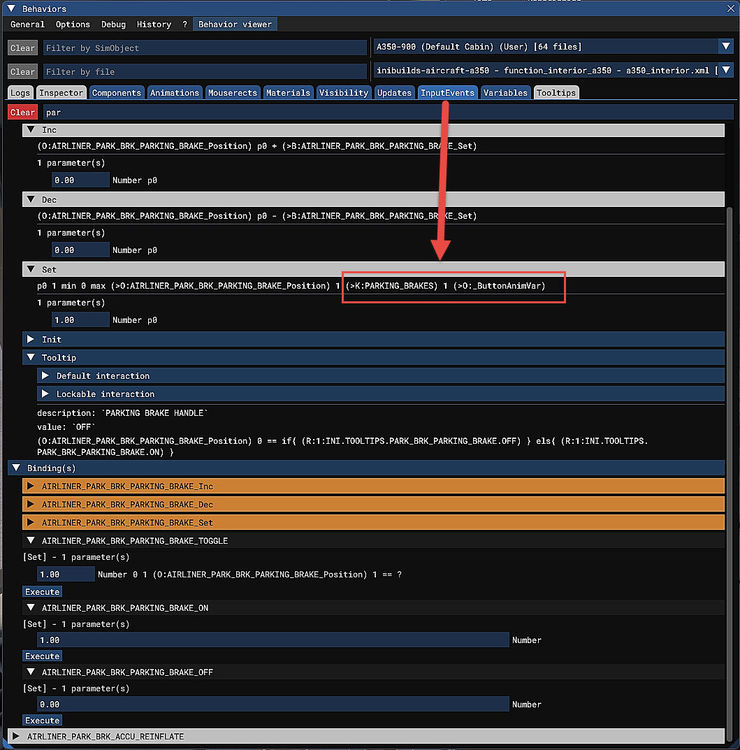
Hi, unfortunately " K:PARKING_BRAKE_TOGGLE" did not work in my code. Then I looked up into the BEHAIOUR window and found that the correct K-event was "K:PARKING_BRAKES" as you can see from the attached screenshot. Using this it worked and now I can set it to ON or OFF by code as required. I am trying to create a complete in-game Flow- and Checklist (from C&D to Securing Aircraft) for your A350 (oral reading of the items in question, checking that the settings are correctly done - including a copilot who automatically makes certain settings - and continuing to the next item if all settings in question are correct. The same I already did for the FENIX A320 - please see This means for the ime being I can now continue working on the Flow- and Checklist for the A350 , but maybe I will come back if there are additionally questions. Anyway thanks for trying to solve my problem.
-
Hi, thanks for the tip to use "PARKING_BRAKE_SET" but unfortunately it did not work. I tried it as a K: as well as a B: event and using the values 0 as well as 1. But the handle did not move from SET and the indication on the PFD as well as the TOMemo in the EWD stays that the brakes are set. The code I used p.e.: <Val Code="(K:PARKING_BRAKE_SET) 1 =="/> - a similar code worked seamingless well in other planes like the FENIX A320. Please suggest what else code I should try to set the brakes to OFF. Thanks.
-
I need the variables to handle the parking brakes for the A350 in a code. The first is the handle e.g. how to move it (found no working variable) and the second is the parking brakes itself. I experimented with B:LANDING_GEAR_PARKINGBRAKE_Set: (1 for ON, 0 for OFF). B:LANDING_GEAR_PARKINGBRAKE_TOGGLE: (1 to toggle). but none of them worked for me. I would appreciate any help to solve this problem. Thanks! Rolf
