



Skip to content
View in the app

A better way to browse. Learn more.

iniBuilds Forum

A full-screen app on your home screen with push notifications, badges and more.

To install this app on iOS and iPadOS
  1. Tap the Share icon in Safari
  2. Scroll the menu and tap Add to Home Screen.
  3. Tap Add in the top-right corner.
To install this app on Android
  1. Tap the 3-dot menu (โ‹ฎ) in the top-right corner of the browser.
  2. Tap Add to Home screen or Install app.
  3. Confirm by tapping Install.

macstevejb

Member
  • Joined

  • Last visited

  1. Thank you so much. I now have access ๐Ÿ˜๐Ÿ‘
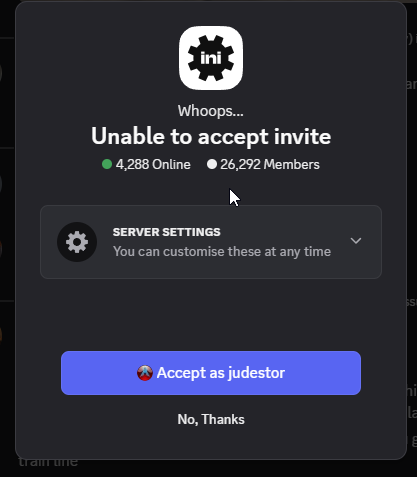
  2. I raised a support ticket (49220) in this respect back in August and was assured by email stating, "Hello There is no account under โ€œjudestorโ€ which is banned" However, when i try to access your discord server, I get this response: I am a paying customer, having purchased two of your aircraft and therefore do not understand why i cannot access your discord, particularly for support etc. Would you please look in to this matter for me. Thank you.
Account

Navigation

Configure browser push notifications

Chrome (Android)
  1. Tap the lock icon next to the address bar.
  2. Tap Permissions โ†’ Notifications.
  3. Adjust your preference.
Chrome (Desktop)
  1. Click the padlock icon in the address bar.
  2. Select Site settings.
  3. Find Notifications and adjust your preference.