



Skip to content
View in the app

A better way to browse. Learn more.

iniBuilds Forum

A full-screen app on your home screen with push notifications, badges and more.

To install this app on iOS and iPadOS
  1. Tap the Share icon in Safari
  2. Scroll the menu and tap Add to Home Screen.
  3. Tap Add in the top-right corner.
To install this app on Android
  1. Tap the 3-dot menu (⋮) in the top-right corner of the browser.
  2. Tap Add to Home screen or Install app.
  3. Confirm by tapping Install.

aaron_gcrr

Member
  • Joined

  • Last visited

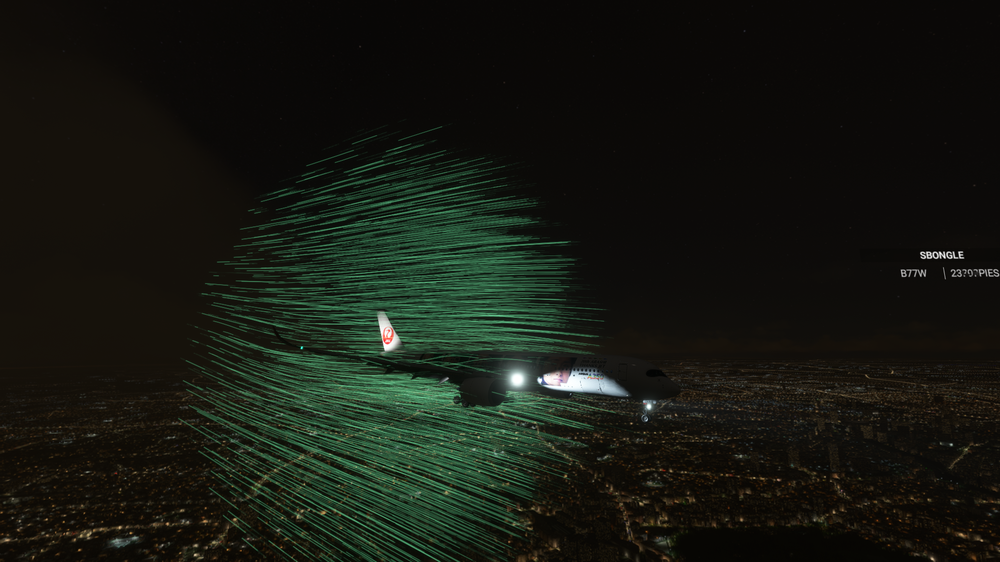
  1. A few days ago I was on a normal flight from Laos to Heathrow and with just 2 hours left to arrive, when I changed the camera from inside to outside it started to show the air passing through the plane. I assumed it was just a bug of the moment, but it didn't turn out to be like that. And after this new update, the bug is still there, since I went in today just to check it and saw that it hadn't been fixed. I hope it has a solution. Thanks in advance.
Account

Navigation

Configure browser push notifications

Chrome (Android)
  1. Tap the lock icon next to the address bar.
  2. Tap Permissions → Notifications.
  3. Adjust your preference.
Chrome (Desktop)
  1. Click the padlock icon in the address bar.
  2. Select Site settings.
  3. Find Notifications and adjust your preference.