




Schaf
Member
-
Joined
-
Last visited
-
Sadly, such a feature doesnt exist with my ISP. However, it seems to work since yesterday ^^
-
At least for me, its working fine again. Seems like Ini or the providers have changed something and the issue is resolved^^
-
Update: It seems like at least for me (Germany, Deutsche Telekom) its working again. #EDIT: Only the store web page is working, IniManager still wont let me log in even after clearing the cache and reinstalling the Manager.
-
This all does nothing if the URL is blocked^^ As it seems right now, for multiple people in multiple countrys for multiple ISPs, the IniBuilds Store URL is blocked or flagged as malicious. Thats why requests are not forwarded. The Store URL is also handling the user session, thats why you cant login.
-
Sadly, my ISP does not provide such an option :( Hopefully Ini finds a permanent solution soon.
-
In the WIndows defender it does not make any difference for me. Please share once you have an update :D
-
Its sadly not working for me. Still gets blocked and I still get forwarded to the Telekom blocking page.
-
Exactly 😁
-
I think Ini is the only one who can really act there. The site may be flagged as unsafe for a variety of reasons. This could be an incorrect assessment by a security provider (ISPs also simply purchase their security data), or it could be a decline in reputation due to invalid certificates, suspicious redirects, etc. However, the issue could also lie with the CDN, in this case, Cloudflare, etc. Ini now needs to initiate its internal incident management process and, as part of that, determine how to proceed. Although I’m a Major Incident Manager, there’s not much more we can do here as customers and outsiders other than wait and see. I think I’d start by checking whether I’m using any expired certificates or if there are any anomalies in the Cloudflare or Shopify dashboard.
-
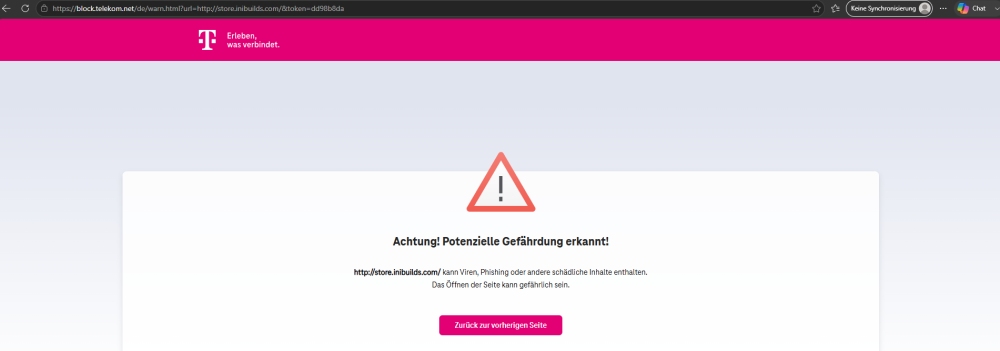
After a short chat with ChatGPT, I tried the curl check again without SSL (http instead of https), the result shows everything: C:\Users\Jonas>curl -v http://store.inibuilds.com * Host store.inibuilds.com:80 was resolved. * IPv6: (none) * IPv4: 23.227.38.74 * Trying 23.227.38.74:80... * Established connection to store.inibuilds.com (23.227.38.74 port 80) from 192.168.2.31 port 60515 * using HTTP/1.x > GET / HTTP/1.1 > Host: store.inibuilds.com > User-Agent: curl/8.21.0 > Accept: / > * Request completely sent off < HTTP/1.1 302 Found < Location: https://block.telekom.net/de/warn.html?url=http://store.inibuilds.com/&token=83b09505 < Connection: close < Content-Length: 0 < * shutting down connection #0 My ISP is blocking the store.inibuilds.com domain because its marked as a side that shares viruses, is used for phishing etc. I assume thats something IniBuilds have to figure out why they are marked as a malicious web page / URL.
-
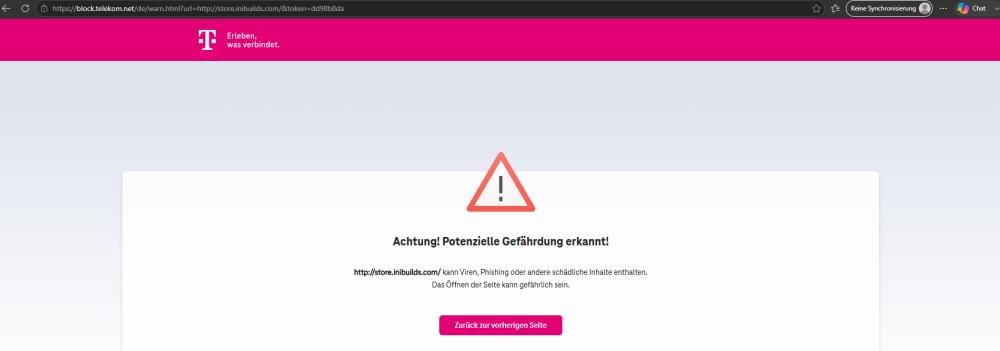
Hi, its not just the US, I'm afraid of. I live in germany and my ISP (Deutsche Telekom) is also blocking the store.inibuilds.com page. I've traced it down to a TSL Error message (SEC_E_INVALID_TOKEN), however I'm not sure if thats a reason why the domain / server is blocked (invalid TSL Token), or if this is a symptome. C:\Users\Jonas>curl -Iv https://store.inibuilds.com * Host store.inibuilds.com:443 was resolved. * IPv6: (none) * IPv4: 23.227.38.74 * Trying 23.227.38.74:443... * schannel: disabled automatic use of client certificate * ALPN: curl offers http/1.1 * schannel: next InitializeSecurityContext failed: SEC_E_INVALID_TOKEN (0x80090308) - Das Token, das der Funktion übergeben wurde, ist ungültig. * closing connection #0 curl: (35) schannel: next InitializeSecurityContext failed: SEC_E_INVALID_TOKEN (0x80090308) - Das Token, das der Funktion übergeben wurde, ist ungültig. #UPDATE: Yes, its blocked my Deutsche Telekom (DTAG) as well. Its marked as a malicious web page and Telekom is blocking the connections. How ever, I dont have the option to disable this check.
-
It could be that the way connections are processed are different between fixnet (DSL / Fibre etc.) and mobile. I work for a german ISP (not the one I'm a customer of, unfortunatley xD) and I can tell you that we process mobile data and fixnet data on different ways.
-
Guys, update: 1. disabled IPv6 in my Windows network adapter settings. The IPv4 traceroute looked just as unremarkable as the first one using IPv6. 2. When I check the connection using Curl (curl -Iv https://store.inibuilds.com), I receive an error during the TLS handshake along with an error stating that the token is invalid (SEC_E_INVALID_TOKEN). I hope this information helps you, dear iniBuilds team. #EDIT: This could also explain why it works for some users when they disable security features of their router or internet connection. These features may perform TLS inspection or otherwise interfere with HTTPS connections. Disabling them could prevent the TLS handshake from being modified or interrupted, which would explain why the error no longer occurs. Unfortunately, my ISP does not offer such an option. C:\Users\Jonas>curl -Iv https://store.inibuilds.com * Host store.inibuilds.com:443 was resolved. * IPv6: (none) * IPv4: 23.227.38.74 * Trying 23.227.38.74:443... * schannel: disabled automatic use of client certificate * ALPN: curl offers http/1.1 * schannel: next InitializeSecurityContext failed: SEC_E_INVALID_TOKEN (0x80090308) - Das Token, das der Funktion übergeben wurde, ist ungültig. * closing connection #0 curl: (35) schannel: next InitializeSecurityContext failed: SEC_E_INVALID_TOKEN (0x80090308) - Das Token, das der Funktion übergeben wurde, ist ungültig.
-
Same goes for me. How ever, as it is working through my phones WiFi which is with another ISP, I dont assume its a Windows Issues.
-
Hey @John N I assume its a problem with the URL the IniManager tries to access for authentication, session handling etc. I dont know if this is a Certificate Issue on IniBuilds side or any Problem with the ISPs. Thats something they have to check. Beside my posts here and my ticket to InIBuilds I have opened a ticket with my provider and told them the exact same, however, I'm still waiting for their response. However, as it is friday afternoon here in germany, I dont expect them to respond before next week :D #EDIT: Let me put it in another way: I assume its a problem with the connection to the Server or to the URL the IniManager tries to connect which is handeling all that stuff mentioned above. Either a certificate issue, an authentication issue or anything else that we as users / customers can not tell.


