




alexanderbunda
Member
-
Joined
-
Last visited
Everything posted by alexanderbunda
-
I'm not sure if anyone else has this problem, but right after V1 the aircraft takes off like a rocket with minimal sidestick input. I can't pitch the nose down, it only starts an aggressive stall once it runs out of speed.
-
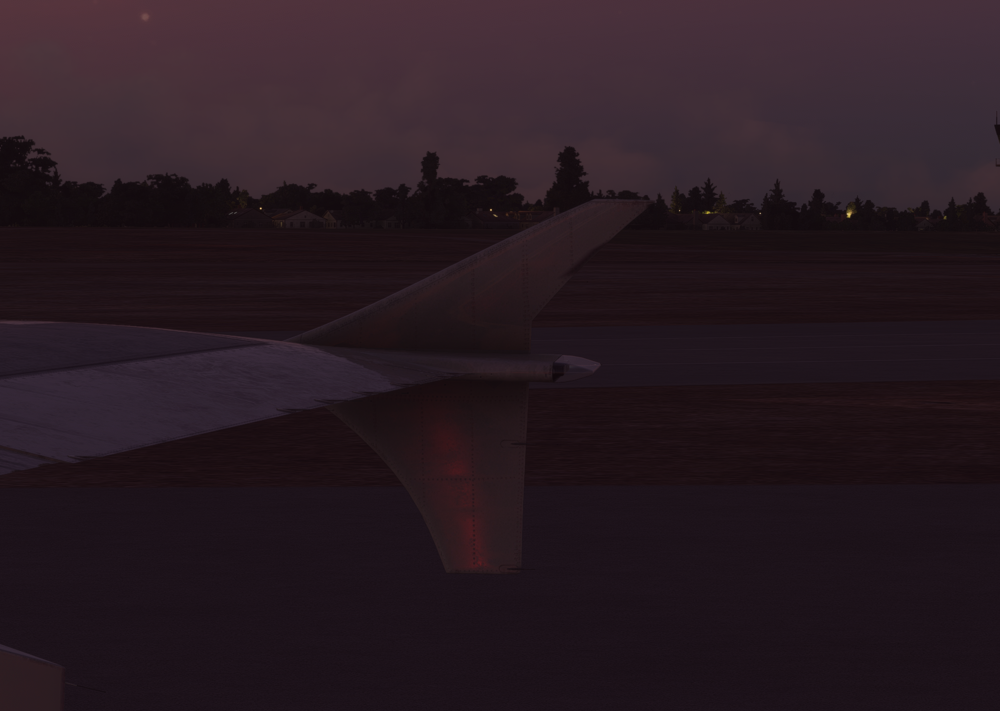
t This is what it looks like now while the plane is on and NAV light on. Whereas it used to have a glow to it like in this picture.

-
Sorry for all the pictures just making sure you guys can see it! 😎You can see it a little bit on the opposite wing in this picture. It almost looks like the NAV light is in the wrong location? I tried re-installing the A310 and running no mods in my community folder and it is still happening. Unless this is what the update was?You can barely see it but that little spec of light floats around the wing while flying it'll move up and down. Usually when on the ground taxiing you can see the white NAV light illuminated until takeoff but now it just does not light up at all.Yes once I get home I’ll take a screenshot!Hello, Ever since the new update the left white NAV light on the A310 is floating above the left wing near the top of the winglet, I am running the latest update AAU2. I know that one of the issues was the NAV light was too bright but now I can barely see any light in that area.


Account
Navigation
Configure browser push notifications
Chrome (Android)
- Tap the lock icon next to the address bar.
- Tap Permissions → Notifications.
- Adjust your preference.
Chrome (Desktop)
- Click the padlock icon in the address bar.
- Select Site settings.
- Find Notifications and adjust your preference.
Safari (iOS 16.4+)
- Ensure the site is installed via Add to Home Screen.
- Open Settings App → Notifications.
- Find your app name and adjust your preference.
Safari (macOS)
- Go to Safari → Preferences.
- Click the Websites tab.
- Select Notifications in the sidebar.
- Find this website and adjust your preference.
Edge (Android)
- Tap the lock icon next to the address bar.
- Tap Permissions.
- Find Notifications and adjust your preference.
Edge (Desktop)
- Click the padlock icon in the address bar.
- Click Permissions for this site.
- Find Notifications and adjust your preference.
Firefox (Android)
- Go to Settings → Site permissions.
- Tap Notifications.
- Find this site in the list and adjust your preference.
Firefox (Desktop)
- Open Firefox Settings.
- Search for Notifications.
- Find this site in the list and adjust your preference.